Woman Tshirt 3D Mockup Template Bundle for Real Design Work
If you have ever spent hours trying to photograph a simple t-shirt design only to end up with awkward shadows, wrinkled fabric, or inconsistent lighting, you already know the pain. Mockups exist to solve that exact problem. The Woman Tshirt 3D Mockup Template Bundle is a set of ready-to-use, layered templates that let you drop your artwork onto a realistically rendered female t-shirt in seconds. No studio, no model, no reshoots.
But beyond convenience, this bundle offers something more subtle: it gives your designs a context. A flat vector on a screen tells a client one thing. The same design wrapped around a fabric-grain textured tee, with natural folds and soft lighting, tells a completely different story. That story is what sells concepts, wins approvals, and builds trust with an audience.
What the Bundle Actually Looks Like in Practice
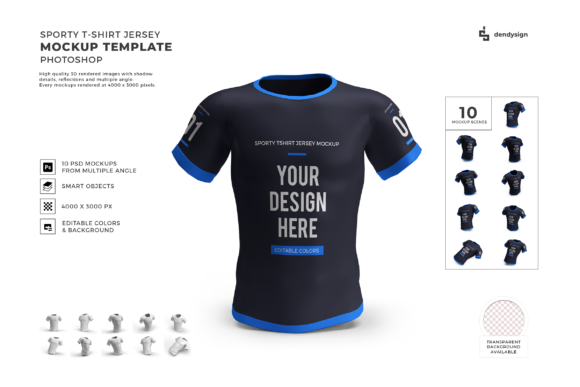
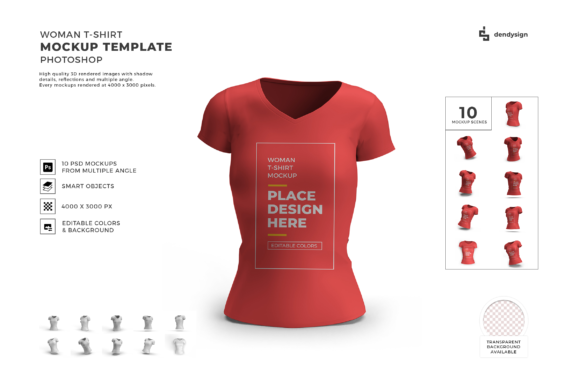
Visually, the bundle leans toward clean, modern realism. The t-shirts are rendered in full 3D with attention to fabric drape, shoulder seams, neckline depth, and subtle body contours. The lighting is soft and diffused, avoiding harsh glare or deep shadows that could distract from your artwork. Backgrounds are minimal—often neutral or transparent—so the focus stays on the garment itself.
The style is commercial and versatile. These are not grunge or heavily styled mockups that impose a specific mood. Instead, they function like a blank canvas for your brand. Whether you are selling minimalist typography, bold illustrations, or delicate handwritten logos, the mockup adapts without fighting your design. The templates typically come in multiple angles: front view, three-quarter view, and sometimes a flat lay or close-up detail. Having those three options within one bundle means you can show a design from different perspectives without buying separate packs.
What makes this bundle particularly useful for small business owners is the layer organization. Each PSD file includes smart object layers labeled clearly. You open the file, double-click the smart object, paste your artwork, save, and the mockup updates automatically. No messing with masks, blend modes, or adjustment layers. It just works.
Where These Mockups Make the Biggest Difference
The bundle shines most in e-commerce product listings. If you sell apparel on platforms like Etsy, Shopify, or Amazon, your main product image is everything. A professional 3D mockup lifts that image from amateur to credible in one frame. Buyers scroll quickly. A realistic mockup stops them because it shows exactly what the garment will look like worn, without the variability of a real photo shoot.
For brand identity projects, these mockups serve as presentation assets. When you pitch a logo or a t-shirt design to a client, placing it on a 3D mockup creates a brand identity piece out of what was just a flat graphic. It signals that you think about how the design lives in the real world. Marketers also use these templates for social media graphics and email campaigns. A well-shot product image posted on Instagram outperforms flat artwork almost every time because it feels tangible.
Print-on-demand entrepreneurs rely heavily on bundles like this. Since you never hold the physical product, the mockup is your only way to preview and sell. Having multiple angles means you can show the front design, a closer detail shot, and how the tee drapes on a body, all without ordering a single sample. Editorial design projects also benefit—styling a t-shirt in a lookbook or a mood board feels authentic when the garment is rendered with real-world depth.
Even crafters and hobbyists find value here. If you design custom t-shirts for a family reunion, a sports team, or a charity event, presenting the design on a mockup makes it feel official. People respond better when they see the shirt on a person-like form rather than a flat rectangle.
How Presentation Quality Shapes Brand Perception
People judge visual professionalism in seconds. When you present a design on a low-quality mockup with pixelated edges or mismatched lighting, that judgment transfers to your brand. The Woman Tshirt 3D Mockup Template Bundle helps you control that impression because it delivers consistent, high-resolution output every time. Your artwork appears sharp, the colors remain accurate, and the garment looks like a real product you could buy.
That consistency builds brand recognition. If every product photo in your shop uses the same mockup style, customers start associating that clean look with your brand. They trust what they see. And trust leads to clicks, add-to-carts, and purchases.
Visual hierarchy also gets a boost. In a well-lit 3D mockup, the eye naturally goes to the design area because the lighting frames it without overwhelming it. The folds and shadows direct attention rather than compete. This is something flat presentations cannot replicate. For designers who care about how a composition lands on fabric, the bundle gives an honest preview of how scale, placement, and contrast work in reality. A logo that looked perfect on screen may feel too small once applied to the mockup. That real-time feedback is invaluable before you send a file to production.
Choosing the Right Mockup Bundle for Your Workflow
Not every mockup bundle is built the same. When evaluating whether the Woman Tshirt 3D Mockup Template Bundle fits your project, start with the included angles. Do you need a front-only view, or do you also want product shots for detail pages and ads? The more angles, the more storytelling options you have.
Next, look at the resolution and file size. Print-grade mockups should be at least 300 dpi. This bundle typically meets that standard, so your images stay crisp even if someone zooms in on your product page. Check whether the bundle offers both PSD and PNG file formats. PSD files give you editing flexibility, while PNG files allow quick use in mockup generators or web tools.
Font pairing may not seem relevant to a mockup bundle, but it matters indirectly. When you style your mockup with supporting text—for example, adding a tagline or a brand name next to the t-shirt—you want the font pairing to complement the design on the shirt. A mockup with a clean, neutral background gives you the freedom to pair any modern typography without clashing. If your shirt has a script font design, you might pair it with a minimal sans serif in the surrounding layout. The mockup itself should not dictate your typography choices; it should disappear enough to let those choices shine.
Readability considerations also enter the picture. When viewing a t-shirt mockup on a mobile screen, the design needs to be legible at small sizes. A bundle that offers realistic scaling helps you test this. You can adjust your artwork size within the smart object until the text reads clearly from a thumbnail view. That is a cheap insurance policy against poor mobile conversions.
Commercial licensing is the final gate. Always confirm that the bundle allows commercial use, especially if you plan to sell the mockup images in your store or use them in client work. Most premium bundles come with a standard commercial license, but read the terms. Some restrict use in certain contexts, like printed merchandise or template resale. Knowing this upfront saves legal headaches later.
Practical Tips for Getting Real Results
Start by organizing your smart objects before you even open the files. Name your artwork layers clearly so you know which mockup angle gets which design. This small habit saves time when you are batch-creating images for a product launch.
Use the mockups as part of a larger brand identity system. Do not just drop the t-shirt image into a listing. Place it on a clean background, add your logo, a short description, and maybe a subtle pattern. An integrated visual presentation looks more professional than a lone product shot. You can also use the same mockup template across multiple colorways of the same shirt to create a cohesive product family.
If you work with design assets, keep a master file of all your mockups organized by type: women's, men's, bags, caps, etc. That way, when a new project lands, you know exactly which template to grab. For repeat clients, reuse the same mockup style across seasons to maintain visual continuity.
Finally, resist the urge to over-style. A mockup is a delivery tool, not a portfolio piece. Keep the focus on your artwork. The Woman Tshirt 3D Mockup Template Bundle handles the realism. You handle the design. That partnership is what turns a good product image into a compelling one.